
October 23, 2026
A practical guide for founders and small teams on building a simple, AI assisted support system without hiring a dedicated support department.
Anablock is a technology and AI systems company helping businesses automate workflows, connect tools, improve lead handling, and build smarter digital growth systems. The Anablock team writes about AI implementation, automation, CRM, lead generation, SEO/AEO, and practical ways businesses can use technology to operate better and grow.
const response = await client.messages.create({
  model: 'claude-3-5-sonnet-20241022',
  max_tokens: 1024,
  system: [
    {
      type: 'text',
      text: 'Your system prompt...',
      cache_control: { type: 'ephemeral' }  // ← Add this
    }
  ],
  messages: [...]
});
response = client.messages.create(
    model="claude-3-5-sonnet-20241022",
    max_tokens=1024,
    system=[
        {
            "type": "text",
            "text": "Your system prompt...",
            "cache_control": {"type": "ephemeral"}  # ← Add this
        }
    ],
    messages=[...]
)
| Metric | Value |
|---|---|
| Cache Lifetime | 60 minutes |
| Minimum Tokens | 1,024 tokens |
| Max Breakpoints | 4 per request |
| Speed Improvement | Up to 85% faster |
| Cost Reduction | ~90% on cached tokens |
| Type | Cost per 1M tokens |
|---|---|
| Regular Input | $3.00 |
| Cache Write | $3.75 (+25%) |
| Cache Read | $0.30 (-90%) |
| Output | $15.00 |
✅ Good Use Cases:
❌ Poor Use Cases:
// TypeScript
const tools = [...];  // Your tools
const toolsWithCache = tools.map((tool, idx) =>
  idx === tools.length - 1
    ? { ...tool, cache_control: { type: 'ephemeral' } }
    : tool
);

const response = await client.messages.create({
  system: [
    {
      type: 'text',
      text: systemPrompt,
      cache_control: { type: 'ephemeral' }
    }
  ],
  tools: toolsWithCache,
  messages: [...]
});
# Python
def add_cache_to_tools(tools):
    tools_clone = tools.copy()
    last_tool = tools_clone[-1].copy()
    last_tool["cache_control"] = {"type": "ephemeral"}
    tools_clone[-1] = last_tool
    return tools_clone

response = client.messages.create(
    system=[
        {
            "type": "text",
            "text": system_prompt,
            "cache_control": {"type": "ephemeral"}
        }
    ],
    tools=add_cache_to_tools(tools),
    messages=[...]
)
// TypeScript
const messages = [
  {
    role: 'user',
    content: [
      {
        type: 'text',
        text: `Document:\n\n${document}`,
        cache_control: { type: 'ephemeral' }  // Cached
      },
      {
        type: 'text',
        text: question  // Not cached - changes each request
      }
    ]
  }
];
# Python
messages = [
    {
        "role": "user",
        "content": [
            {
                "type": "text",
                "text": f"Document:\n\n{document}",
                "cache_control": {"type": "ephemeral"}  # Cached
            },
            {
                "type": "text",
                "text": question  # Not cached
            }
        ]
    }
]
// Cache hierarchy: Tools → System → Document → Question
const response = await client.messages.create({
  tools: addCacheToLastTool(tools),  // Breakpoint 1
  system: [
    {
      type: 'text',
      text: systemPrompt,
      cache_control: { type: 'ephemeral' }  // Breakpoint 2
    }
  ],
  messages: [
    {
      role: 'user',
      content: [
        {
          type: 'text',
          text: document,
          cache_control: { type: 'ephemeral' }  // Breakpoint 3
        },
        {
          type: 'text',
          text: question  // Not cached
        }
      ]
    }
  ]
});
{
  "usage": {
    "input_tokens": 750,
    "cache_creation_input_tokens": 1772,  // First request
    "cache_read_input_tokens": 1772,      // Subsequent requests
    "output_tokens": 350
  }
}
| Field | Meaning |
|-------|---------||
| input_tokens | Fresh tokens processed |
| cache_creation_input_tokens | Tokens written to cache (first request) |
| cache_read_input_tokens | Tokens read from cache (subsequent) |
| output_tokens | Response length |
const cacheHitRate =
  (usage.cache_read_input_tokens /
   (usage.input_tokens + usage.cache_read_input_tokens)) * 100;

console.log(`Cache hit rate: ${cacheHitRate.toFixed(1)}%`);
// Request 1
const doc = "Analyze this document.";

// Request 2
const doc = "Analyze this document!";  // Added "!" - cache miss!
Fix: Keep cached content identical.
// Wrong - no place for cache_control
messages: [
  { role: 'user', content: 'Hello' }
]

// Correct - longhand format
messages: [
  {
    role: 'user',
    content: [
      {
        type: 'text',
        text: 'Hello',
        cache_control: { type: 'ephemeral' }
      }
    ]
  }
]
// Too short - won't cache
system: "You are helpful."  // ~50 tokens

// Better - combine elements to exceed 1024 tokens
system: [detailed_instructions] + [examples] + [guidelines]
// Request 1
tools = [toolA, toolB, toolC]

// Request 2
tools = [toolB, toolA, toolC]  // Different order - cache miss!
Fix: Maintain consistent tool order.
// TypeScript
function analyzeCacheUsage(usage: Anthropic.Usage): void {
  if (usage.cache_creation_input_tokens) {
    console.log('✓ Cache created:', usage.cache_creation_input_tokens, 'tokens');
  }

  if (usage.cache_read_input_tokens) {
    console.log('✓ Cache hit:', usage.cache_read_input_tokens, 'tokens');
  }

  if (!usage.cache_creation_input_tokens && !usage.cache_read_input_tokens) {
    console.log('⚠️  No caching occurred - check:');
    console.log('  - Content is >1024 tokens');
    console.log('  - cache_control is set');
    console.log('  - Using longhand format');
  }
}
# Python
def analyze_cache_usage(usage):
    if usage.cache_creation_input_tokens:
        print(f"✓ Cache created: {usage.cache_creation_input_tokens} tokens")

    if usage.cache_read_input_tokens:
        print(f"✓ Cache hit: {usage.cache_read_input_tokens} tokens")

    if not usage.cache_creation_input_tokens and not usage.cache_read_input_tokens:
        print("⚠️  No caching occurred - check:")
        print("  - Content is >1024 tokens")
        print("  - cache_control is set")
        print("  - Using longhand format")
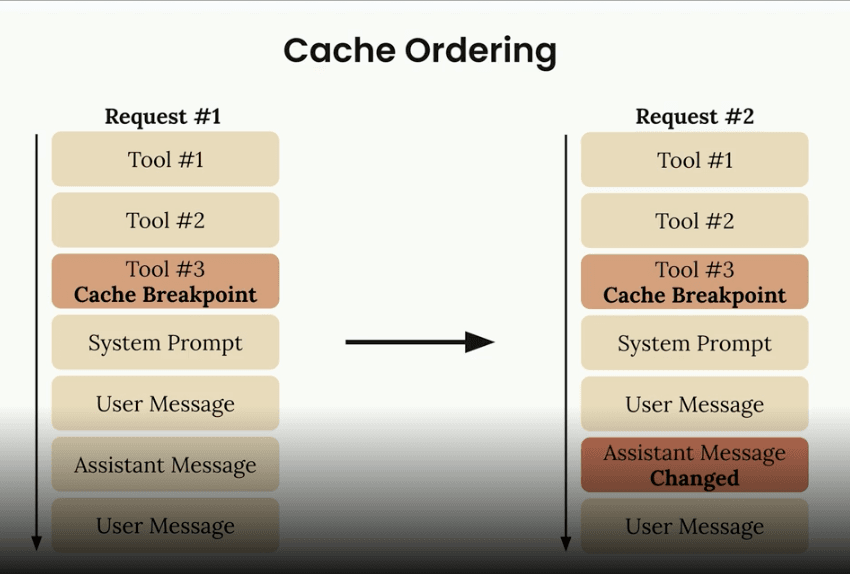
cache_read_input_tokens to measure effectivenessClaude processes components in this order:
Place breakpoints strategically based on what changes:
Do you send the same content repeatedly?
├─ No → Don't use caching
└─ Yes
   ├─ Is content >1024 tokens?
   │  ├─ No → Combine elements or skip caching
   │  └─ Yes
   │     ├─ Requests within 1 hour?
   │     │  ├─ No → Consider cache warming
   │     │  └─ Yes → ✅ Use caching!
cache_controlPrint this cheat sheet and keep it handy while implementing prompt caching!
Written by

AI Insights & Innovations
Anablock is a technology and AI systems company helping businesses automate workflows, connect tools, improve lead handling, and build smarter digital growth systems. The Anablock team writes about AI implementation, automation, CRM, lead generation, SEO/AEO, and practical ways businesses can use technology to operate better and grow.


If you are ready to move from research to implementation, we can help map the right AI system around your tools, data, team, and goals.